Sounding Keyboard and Mouse - Lets you hear magic sound when you press keys or click mouse
Price :$29.95

Shipping Info:
1. Registration Code will be sent by Email
2. Download Insurance Service (Optional)
3. Backup CD(Optional)
4. 100% Purchase Secure.
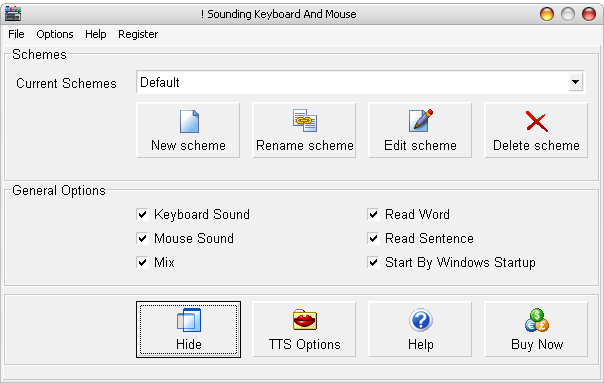
Sounding Keyboard and Mouse - the tool that lets you hear different sound when you press keys or click mouse.
With this tool, you can specify wave file and midi note to every key on keyboard or mouse buttons. When these keys are being pressed or released, the wave/ MIDI will be played. Different keys can be specified different sound.
Now you can turn your keyboard into musical instrument with Sounding Keyboard and mouse easily and quickly.
With TTS Engine, the program can vocalize the text you are typing at the completion of each character or each word or each sentence.
Using Sounding Keyboard & Mouse means that you can touch-type and have your computer confirm that you have been typing without spelling mistakes.
Every mouse button or keyboard key can be specified a MIDI note or WAV files. Now you can enjoy an easy to use electronic piano designed by yourself. Try it for free.
1. Sound follows keystroke or mouse click.
2. Read the word after your typing.
3. Read the sentence after your typing.
4. Read the character after your typing.
5. Specify the sound for every key.
6. Read specify text when key pressed.
7. Specify MIDI note to every key.
8. Specify wav for key down or key up.
Buy Sounding Keyboard and Mouse Only $29.95
Download Free Trial Version of Sounding Keyboard and Mouse.
Size:2.73 MB. Download and unzip the packaged installer with password 'abc'.
Sounding Keyboard and Mouse free download, Sounding Keyboard and Mouse offical site, key sound
Comments:
Serial Code: 62333333
Activation code?
Thank you.
-By Wilson on May 10, 2019, 11:50 am
registration code
-By aravinrh on April 12, 2020, 9:29 am
how to buy this
-By Caratbit on February 23, 2021, 9:31 pm